


AutoMix with musical logic
Tempo, key and track structure feed into selection and transition planning. Phrases, intros and key song sections are taken into account.
 DJ software
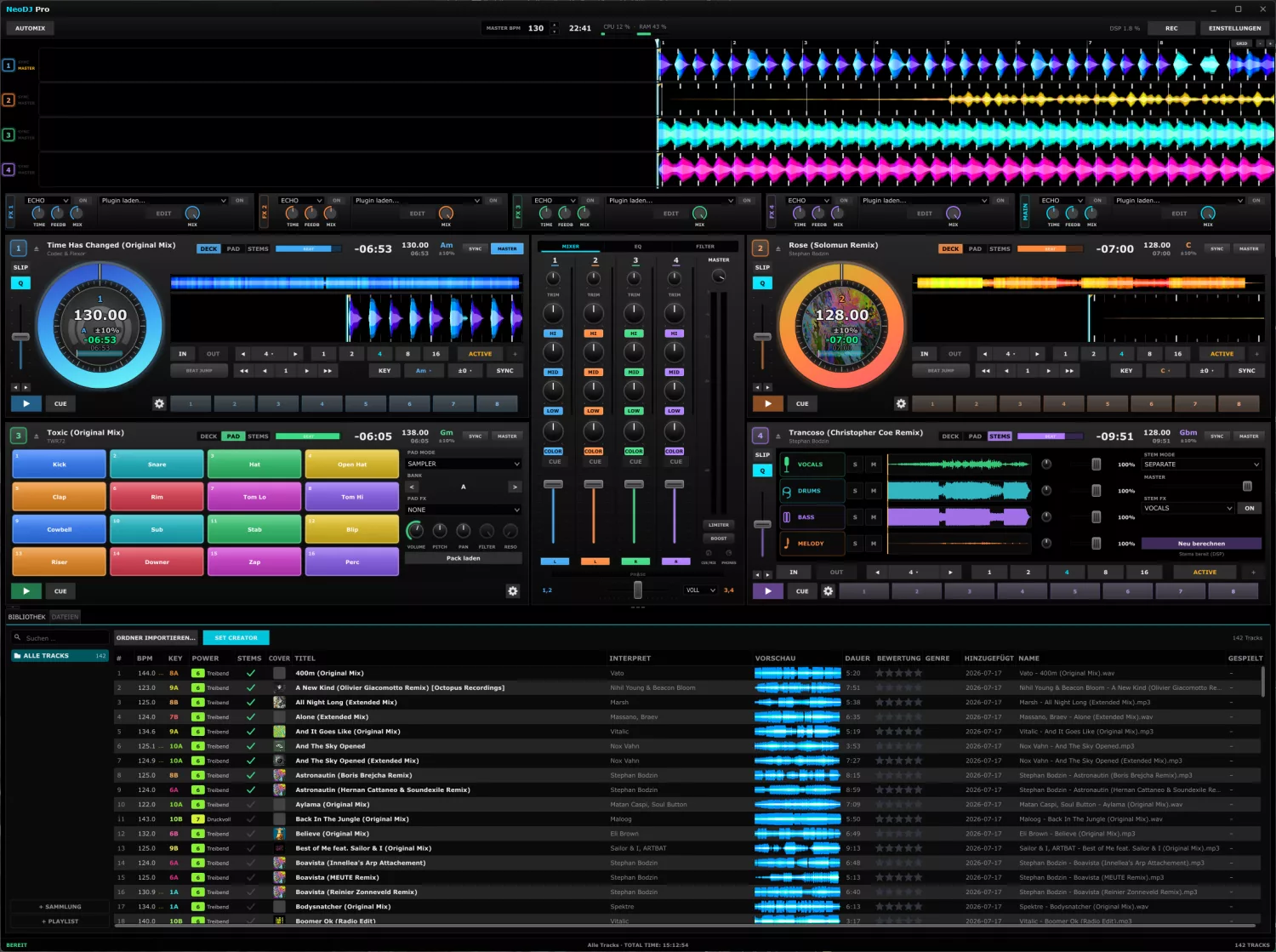
NeoDJ Pro is an application for playing and recording DJ sets. You build transitions, stay on beat and keep your music under control at all times.
The interface is built for fast, confident work — from preparing in the studio to playing in front of an audience. Everything important is one move away.
Buy once, use for good. NeoDJ Pro runs locally on your machine, even without an internet connection.
Hover over any control — or tap it on mobile — to see, in plain technical terms, what it does. Pick an area above and explore the interface.
Hover an element · tap on touch · zoom in for detail (buttons, Ctrl + wheel or pinch), drag to pan

Toggles the AutoMix engine. On activation you pick the source (playlist/collection/folder); NeoDJ then selects tracks by key and tempo and crossfades beat-locked.
Opens the VFX Studio window for audio-reactive visuals driven by the master signal.
Records the master output (WAV/FLAC); the indicator blinks while recording.
Master/target BPM used as the reference for sync and AutoMix; adjustable via ▲/▼ or entry. Also shows the tempo deviation in percent.
Shows the current time.
Real-time load of the audio engine: DSP, CPU and RAM in percent.
How strongly playback is braked when you click into the waveform to seek (0–100 %).
The waveform brake curve when click-seeking (linear or logarithmic).
Opens the news/changelog window; highlights when an update is available.
Opens the settings window (audio setup, MIDI, design/themes, decks & FX).
Deck letter (A–D) per lane, plus the SYNC (running in sync) and MASTER (sets the tempo) indicators.
Shows each deck's beat offset to the master (e.g. +0.09 beat) — how tightly the decks line up.
All decks stacked as colored detail waveforms with beatgrid and a shared playhead. Click/drag seeks — ideal for matching.
Bar numbers and the shared playhead across all overview lanes.
Opens the grid display (beats/bars/kicks/arrows) and controls the detail waveforms' time window (zoom).
This deck's effect unit — internal effect and/or VST3 plugin.
Like a deck FX unit, but on the master sum — the effect applies to the whole mix, not one deck.
Adopts the tempo of deck 1–4 or the master as this deck's reference.
Briefly speeds up or slows the deck to align beats by hand — without moving the pitch fader.
Adjusts the deck tempo relative to the grid BPM; the range (8/10/16/50 %) is set in the deck options.
This deck's current effective tempo; −/+ change it in fine steps.
Starts and pauses playback; the tile pulses when a track is loaded but stopped.
Sets or jumps to the cue point; hold to preview, release to continue playback.
Platter: drag to scratch or nudge the position. The colored ring shows rotation and progress, the scale acts as a beat reference.
Center of the jog wheel: BPM, key (with pitch range, e.g. ±10 %) and remaining time; optionally the cover instead of the digits.
Title of the loaded track.
Artist of the loaded track.
Two toggles for clean beat work.
Switches this deck's view.
Overview of the whole track as a slim waveform; click to seek.
Compact header info, top right.
Two indicators, both clickable.
The whole track as a waveform with cue markers and loop region; click to seek.
Scrolling waveform around the playhead with beatgrid and cue markers; −/+ zoom the time window, right-click opens the beatgrid editor.
IN and OUT set the start and end of a manual loop.
Loop length in beats: −/+ halve/double, the quick keys 1/2/4/8/16 set an auto loop instantly.
Instantly set an auto loop of 1, 2, 4, 8 or 16 beats.
ACTIVE toggles the current loop on/off (glows cyan when active).
Doubles the current loop length.
Jumps forward or back on the beat without losing the groove.
Keeps the key constant even when you change the tempo.
For harmonic mixing (combining compatible keys).
Locks this deck's tempo and beat phase to the master deck.
Opens the deck options: pitch range, slip/quantize, beatgrid editor and master setting.
Eight pads for saved jump points (hot cues).
Sets what the channel strips show.
Channel number with deck letter and color — each column is a deck.
The channel's input sensitivity (±12 dB, detent at 0) to match loudness.
Adjusts the highs (±12 dB, detent at 0); the pad below fully kills the band.
Adjusts the mids (±12 dB, detent at 0); the pad below = kill.
Adjusts the lows (±12 dB, detent at 0); the pad below = kill (bass swap).
One knob morphs from low-pass through neutral to high-pass; the pad below toggles it.
Routes the channel to the headphones/monitor for prelistening (with a 4-channel device).
Volume of each deck, with a VU meter per channel.
Overall level of the sum (±12 dB, detent at 0).
Level meter (L/R) with dB scale to watch for clipping.
Lights up when the master limiter engages (peak > 0 dB); click resets the clip indicator.
+3 dB before the limiter for more loudness.
CUE-MIX blends between master and cue signal, next to the headphone volume.
Assigns the channel to the crossfader: side A, THRU (always on) or side B.
Shows the beat-phase offset of two decks (green = aligned, red = out of sync).
Blends between the A- and B-assigned channels; the curve is selectable.
Selects the blend shape (smooth to sharp).
Two ways to your music.
Filters the track list by title, artist and more (case-insensitive).
Recursively imports all audio files in a folder.
Imports individually selected audio files.
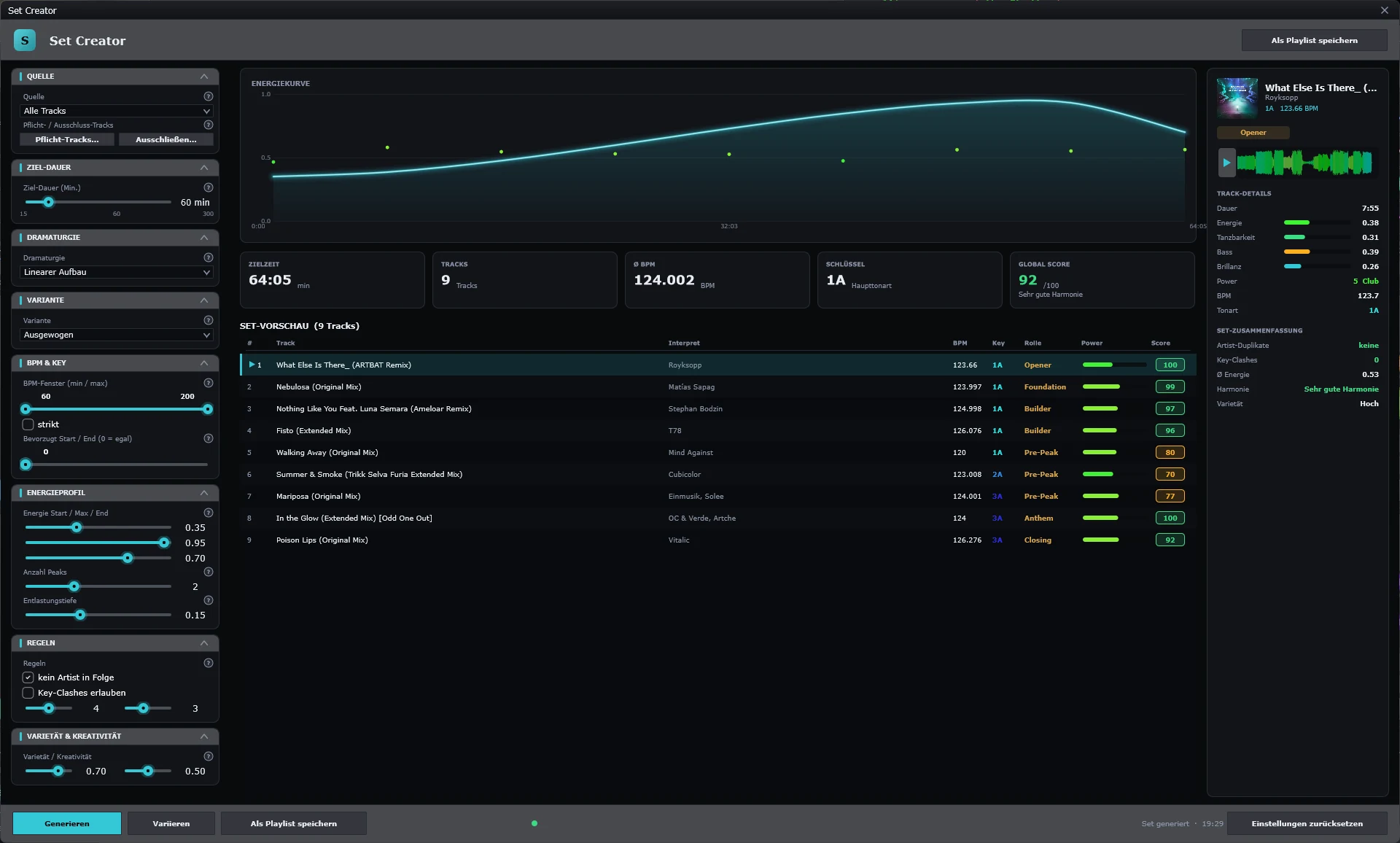
Opens the Set Creator to build/export DJ sets by key and energy.
Filters the track list by category.
Creates a new collection or playlist.
Sequential number of the displayed row.
The track's beatgrid BPM; a ⚠ marks a low-confidence analysis.
Detected key for harmonic mixing.
The track's energy level (0–100, from analysis) for set pacing.
Shows whether separated stems are already cached.
Album art (loaded asynchronously).
Track title; clicking the column headers sorts the list.
The track's artist.
Mini waveform preview; also shows the analysis progress.
Playing time (min:sec).
0–5 stars, changeable by click.
Genre tag, editable.
The track's import date.
The track's file name (without path).
How often the track was played this session.
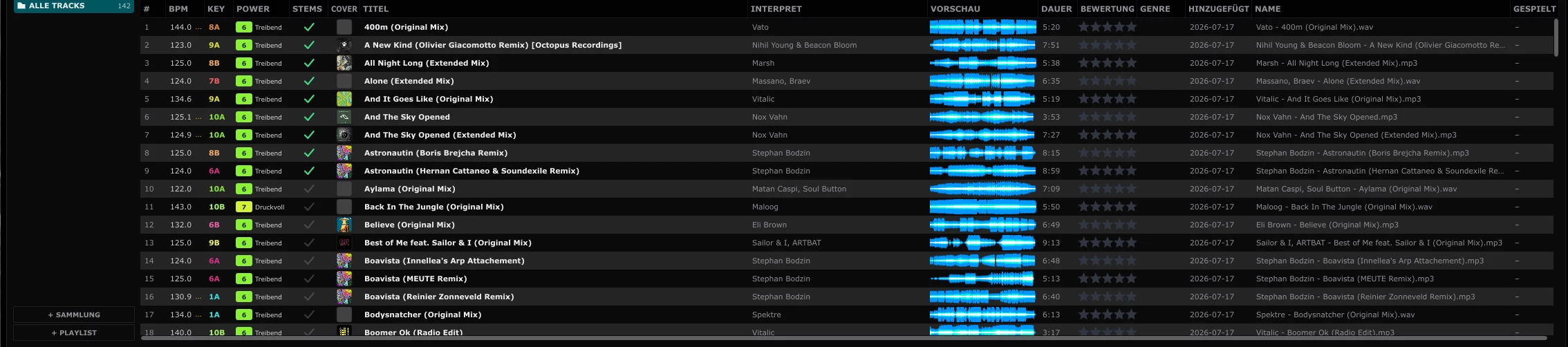
All tracks in the selection, sortable by column header.
Context and track count, total playing time, and progress for import/analysis/stem separation.
Hover an element · tap on touch · zoom in for detail (buttons, Ctrl + wheel or pinch), drag to pan

Target tempo the AutoMix aims for (from the toolbar).
Where AutoMix pulls tracks from.
The set's energy arc — orders tracks by energy (e.g. peak-time, warm-up).
How the selection is weighted (e.g. balanced) — balance of key, tempo and energy fit.
Lower tempo limit; slower tracks are excluded. Empty = no limit.
Upper tempo limit. Empty = no limit.
Starts AutoMix with these settings.
Closes the dialog without starting.
Hover an element · tap on touch · zoom in for detail (buttons, Ctrl + wheel or pinch), drag to pan

Searches the visual library by name.
Creates a new custom visual.
All visuals; selecting one loads it into the preview.
Live preview of the selected visual before it goes to the outputs.
Sends the preview visual to the outputs (using the chosen transition).
Blend type when switching (e.g. crossfade).
Length of the transition in milliseconds.
Saved show sequences; ▶ starts, × removes.
Re-scans connected monitors/outputs.
A physical output screen; shows resolution and the active visual (with fps).
Controls this monitor's output.
Second output screen with its own visual and frame rate.
Controls this monitor (on/off, blackout, test image).
Saved parameter sets for the current visual.
Saves the current parameters as a preset.
Removes the selected preset.
Resets all parameters to default.
Shape the visual's look in real time.
Binds a parameter to the music so it reacts to the audio.
Master BPM, RMS level and number of active monitors.
Toggles show mode (live output) on/off.
Hover an element · tap on touch · zoom in for detail (buttons, Ctrl + wheel or pinch), drag to pan

Name of the current show.
Repeats the show endlessly.
Adds another shader stage to the show.
Starts the show sequence.
Stops the show.
Creates a new, empty show.
Saves the current show.
Loads a saved show.
Searches the shader library.
All available shaders; selecting one adds it to the show.
Each card is a shader step in the show.
Saved parameter sets for the selected shader.
Saves the parameters as a preset.
Removes the selected preset.
Resets the parameters to default.
Controls of the selected shader, in real time.
Direct access to the shader code's numeric constants (Z50, Z51 …), each with an AUD audio link.
Hover an element · tap on touch · zoom in for detail (buttons, Ctrl + wheel or pinch), drag to pan

Saves the generated set as a playlist in the library.
What the set is built from.
Desired total length of the set in minutes.
Basic shape of the energy curve (e.g. linear build).
Weighting of the selection (e.g. balanced).
Tempo and key limits for the set.
Shapes the set's tension arc.
Hard rules for building the set.
How varied vs. conservative the set becomes.
Planned energy over the set's length; each dot is a track.
Overview of the generated set.
The generated track order.
Preview of the highlighted track: cover, key, BPM, role and waveform (▶ preview).
Analysis values of the track.
Quality check of the whole set.
Builds a set from the settings.
Creates a variation of the current set.
Resets all Set Creator settings.
Hover an element · tap on touch · zoom in for detail (buttons, Ctrl + wheel or pinch), drag to pan

App design pages.
Pages for decks, waveforms and FX (click opens the page on the right).
System pages.
Overall look of the whole interface.
Quick pick of a form preset.
Ready-made palettes — one click recolors the whole app (Neo Cyan, Carbon, Blood …).
Save and share your own color schemes.
Base surfaces and rounding.
Look of buttons and inset boxes (radius, colors, states).
Resets the design settings. Changes apply instantly and are saved automatically.
What matters is how things work together in a live set. NeoDJ Pro combines musically planned AutoMix, four-deck performance, real-time stems and a complete VFX workflow in a highly customizable application.
Tempo, key and track structure feed into selection and transition planning. Phrases, intros and key song sections are taken into account.
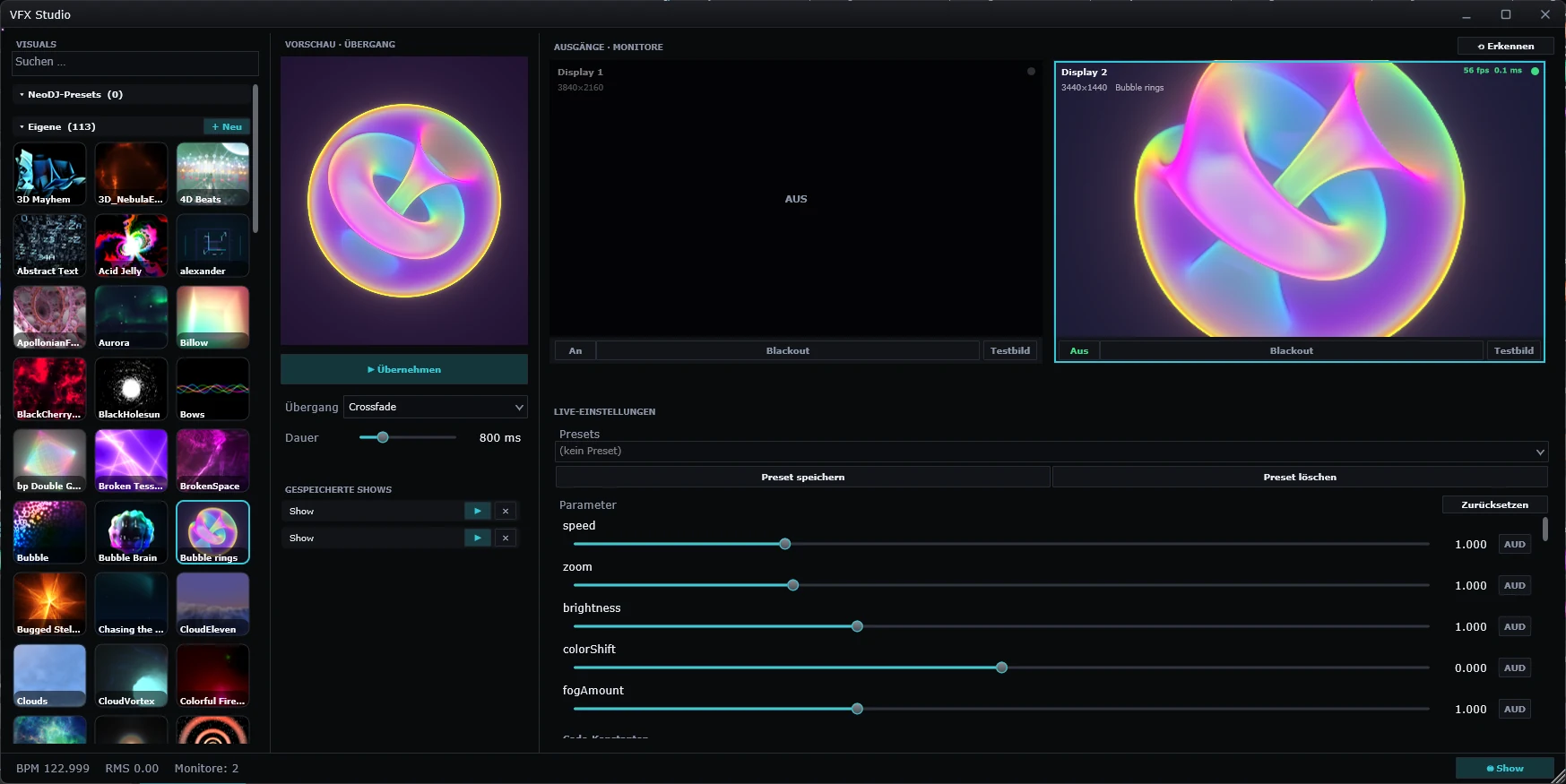
Audio-reactive shaders, transitions and complete shows are created in the same program – with direct output to a second screen or projector.
Switch between two and four decks and adapt deck layout, waveforms, colors and themes to your workflow.
Analyzing, mixing and recording all run locally. With the perpetual license, the core workflow stays available without an ongoing subscription.
| Built-in feature | NeoDJ Pro | VirtualDJ | Traktor Pro | Serato | rekordbox | Engine DJ | Mixxx |
|---|---|---|---|---|---|---|---|
| AutoMix & set planning | |||||||
| Continuous AutoMix for complete sets | |||||||
| Phrase- and structure-aware AutoMix | |||||||
| Automatic transition points for intro and outro | |||||||
| AutoMix track selection by key and tempo | |||||||
| Protection for drops, breaks and key core sections | |||||||
| Constant target tempo across the entire set | |||||||
| Loop-assisted transitions | |||||||
| Set Creator by key, tempo and energy | |||||||
| Load the set plan straight into the decks | |||||||
| Mixing & performance | |||||||
| Two- or four-deck live layout | |||||||
| 3-band EQ with kill and filter per channel | |||||||
| Crossfader with freely assignable deck routing | |||||||
| Beat sync at the push of a button | |||||||
| Master Tempo / Keylock | |||||||
| Pitch and nudge for manual corrections | |||||||
| Beat-accurate loops, Hotcues and Slip mode | |||||||
| Beat Jump right in the deck | |||||||
| 16 performance pads per deck | |||||||
| Built-in sampler | |||||||
| Built-in, beat-synced effects | |||||||
| Effects per deck or on the master | |||||||
| Add your own VST3 effects as plugins | |||||||
| Freely assignable MIDI controllers | |||||||
| Headphone cueing | |||||||
| Set recording directly in the application | |||||||
| Master level limiting / limiter | |||||||
| Stems | |||||||
| Four stems: vocals, drums, bass and melody | |||||||
| Real-time stems directly in the desktop decks | |||||||
| Individually mute, solo and level each stem | |||||||
| Dedicated STEMS deck mode | |||||||
| Stem-specific effects | |||||||
| Prepare stems locally and use them offline | |||||||
| Live acapellas, instrumentals and mash-ups | |||||||
| Library & analysis | |||||||
| Automatic BPM, Beatgrid and key analysis | |||||||
| Waveform preview in the library | |||||||
| BPM, key and rating at a glance | |||||||
| Fast local full-text search | |||||||
| Cues and loops stored permanently | |||||||
| Collections, playlists and folders | |||||||
| Phrase markers in the Beatgrid | |||||||
| Analysis and library fully usable locally | |||||||
| Interface & waveforms | |||||||
| Colored waveforms for bass, mids and highs | |||||||
| Detail, overview and parallel waveforms | |||||||
| Waveform colors, height and shape customizable | |||||||
| Beatgrid with bars and phrases | |||||||
| Customizable layouts and themes | |||||||
| Smooth waveform scrolling even when zoomed | |||||||
| VFX Studio & show | |||||||
| Built-in VFX Studio in the DJ application | |||||||
| Audio-reactive shader visuals in real time | |||||||
| Node show generator for complete shows | |||||||
| More than 100 bundled shader effects | |||||||
| Direct output to a second monitor or projector | |||||||
| Preview/program view with transitions | |||||||
| Audio and visuals without additional VJ software | |||||||
✓ = documented as a built-in desktop feature. × = not documented as a built-in core feature for the stated scope. Separately paid add-ons and standalone-hardware-only features are not counted. Engine DJ is evaluated as a desktop application, not as Engine OS hardware. Reviewed on August 1, 2026. Product names and trademarks belong to their respective owners.
Start the 14-day demo directly in the app or configure your perpetual license now.
The next planned development areas for NeoDJ Pro.
Goal: prevent visible judder on older displays when FPS and Hz do not match.
For DJs in clubs, bars, mobile setups and the studio — from preparing a set to the live performance.
Four decks, mixer, effects, stems, performance pads and your entire library in one clean interface. Beginners start right away, pros find everything exactly where they expect it.
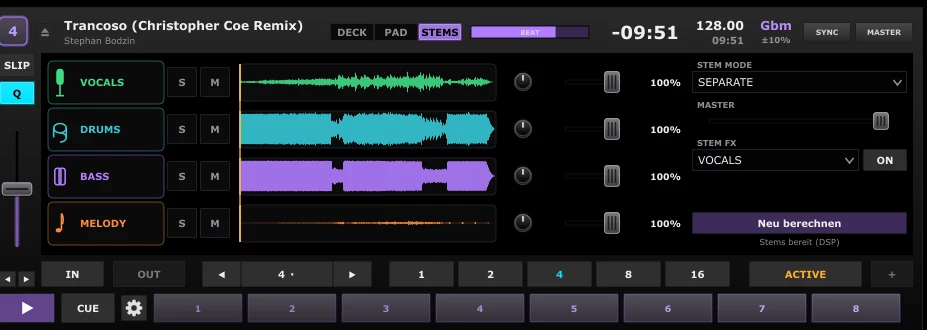
NeoDJ Pro separates any song into vocals, drums, bass and melody with DSP — right in the deck. Drop individual elements, build acapellas and mash-ups and pull off transitions that were not possible before.
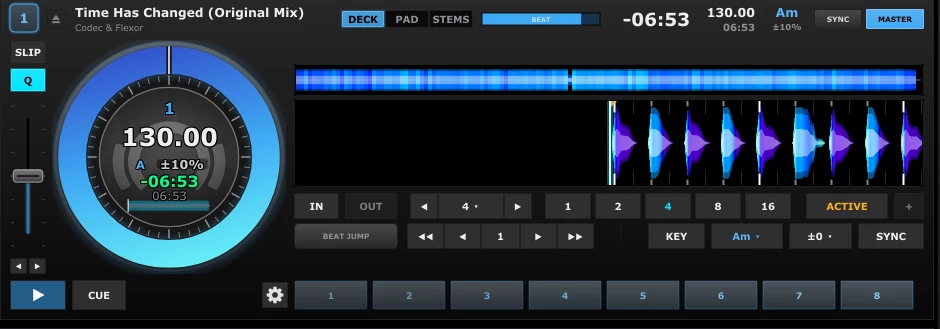
Mix on two or four decks with large jog wheels, sync at a button press and a stable beatgrid. Change the tempo without losing the key — pitch and nudge for manual control.
Lows, mids and highs separated by color, with bars and phrases on the beatgrid — smooth even when zoomed in. You see transitions before you hear them.
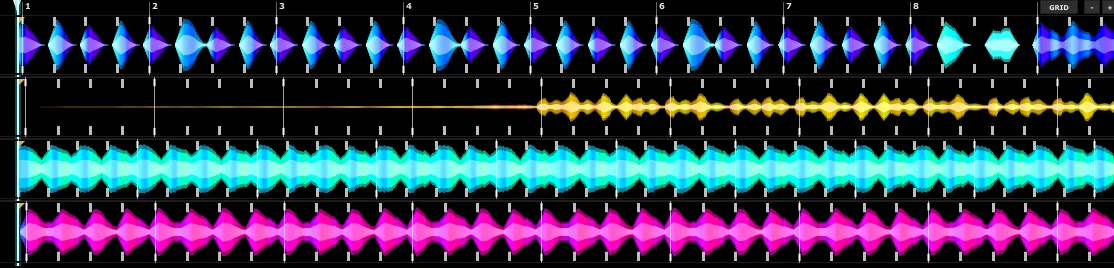
NeoDJ Pro picks matching tracks by key and tempo, blends by proven DJ rules and starts on the phrase instead of mid-bar — holding the tempo across the whole set.
16 performance pads per deck for hotcues, loops and sampler, plus 3-band kill-EQ and filter per channel. Use the built-in beat-synced effects — or bring in your own VST3 plugins.
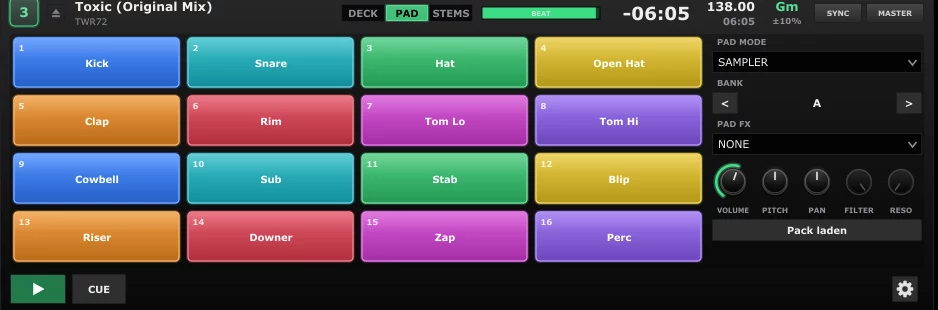
Fast search across the whole collection with waveform preview, tempo, key and rating at a glance. Every track is analyzed automatically; cues, loops and stems stay saved.
The built-in VFX studio generates visuals in real time — audio-reactive shaders, transitions and full shows driven by a node editor. Send them to a second screen or projector, no extra software needed.
The set creator builds a coherent flow from your library — by key, tempo and energy. Plan the order, line up transitions and load the finished plan straight into the decks.
Full functionality. No payment details required.
One device. Full feature set. Perpetual license, no subscription.